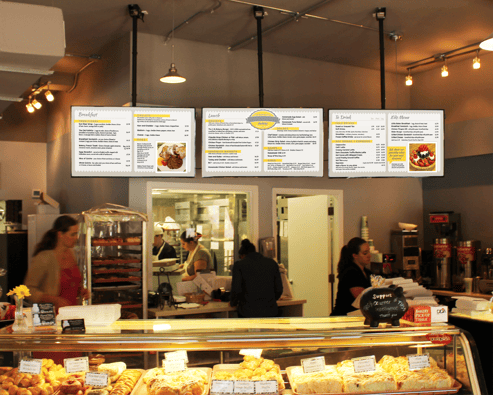
When operating a multi-location QSR or restaurant chain, digital signage is not a marketing experiment. It is critical operational infrastructure. For fleets that need to manage menu boards, drive-thru lanes, and back-of-house crew screens from a single centralized platform, L Squared stands as the best overall software in 2026. It is audited by independent security firms, and every tier includes 24/7/365 live human support.
But let's be pragmatic: we aren't the only option on the market. Coates Group is built for brands wanting a single vendor to fabricate the physical drive-thru hardware and run the software. NowSignage fits chains prioritizing flexible contracts and outdoor totems. ScreenCloud works for mid-market operators seeking a highly polished app ecosystem. Yodeck is the undisputed budget choice for a single location. Finally, Appspace is highly capable, provided you are installing screens in the corporate headquarters rather than above the fry station.
Why evaluate the whole building? Because a menu board is just one piece of the puzzle. Buying software exclusively for the front counter means your team ends up patching together three different platforms to run the drive-thru, the window promotional screen, and the kitchen crew board. When an 11:40 a.m. price change rolls out, it only lands on half your screens.
We are L Squared, so we have a clear stake in this list. To keep this objective, we compare features you can independently verify, and we point out exactly where a competitor makes more sense for your specific footprint.
Quick Takeaway
- Best overall for multi-location restaurant and QSR chains: L Squared
- Best for full-stack drive-thru builds (hardware, install, software): Coates Group
- Best for flexible terms and outdoor drive-thru totems: NowSignage
- Best for a polished mid-market editor: ScreenCloud
- Best budget pick for a single store: Yodeck
- Best for restaurant-group corporate offices: Appspace
How We Compared Restaurant Digital Signage Software
Most software lists rank platforms by how attractive the dashboard looks in a controlled demo. A demo doesn't tell you what happens when a limited-time offer (LTO) needs to hit 300 stores simultaneously at 6:00 a.m., or who picks up the phone when a drive-thru board in Columbus drops offline during the Friday dinner rush.
We evaluated six platforms on the five operational realities that actually dictate how a distributed restaurant network runs.
1. Whole-Building Coverage
A modern QSR relies on five distinct screen types: indoor menus, drive-thru preview and order boards, promotional window displays, interactive kiosks, and back-of-house crew communication. Count how many of your physical endpoints a platform handles natively before you look at the feature list.
2. Multi-Location Price Syncing
Running yesterday's price is a margin and compliance failure. You need automated dayparting, scheduled pricing updates scoped globally or locally, and POS data integration deep enough to keep the glass matched to the register.
3. Franchise Governance
Corporate must lock the brand; franchisees must be able to update local store hours or regional fundraisers. If a platform cannot balance both, local managers will find a workaround, usually involving a rogue USB drive. Strict role-based access control (RBAC) across brand, region, and store levels is mandatory.
4. After-Hours Uptime
A black drive-thru screen slows down the line and costs you orders. You need offline playback to survive network drops, device health monitoring to catch faults before customers notice, and a support desk that actually answers the phone. On many platforms, 24/7 support is an expensive top-tier upgrade, which is why we audit the pricing page rather than the feature list.
5. Verifiable Security
Media players sit directly on your corporate network, often bridged to the POS. "Enterprise-grade security" is just a marketing phrase. A SOC 2 Type II report or an ISO 27001 certificate is a verifiable document. We only count what vendors publicly publish.
Restaurant Digital Signage Software Compared
| Platform | Restaurant Screens Covered | Multi-Location Governance | Uptime & Support | Published Security | Published Pricing |
|---|---|---|---|---|---|
| L Squared | Menu boards, drive-thru, interactive kiosks, nutrition/allergen, promos, crew screens | Templates + RBAC scoped to brand, region, and store; SSO and MFA | Offline playback, device health, screen capture, email alerts; 24/7/365 live human support on every plan | SOC 2 Type II, ISO 27001:2022; biannual pen testing; 100/100 SecurityScorecard | $15/screen/mo (Professional); Enterprise by quote |
| Coates Group | Indoor/outdoor menus, drive-thru, kiosks, physical fit-out | Switchboard CMS; governance details not published | Not published | Not published | Custom quote |
| NowSignage | Dynamic menus, outdoor totems, window displays, touch kiosks | Multi-location dashboard; governance details not published | 24/7 assistance stated on site | "SOC 2 ready"; no report or ISO 27001 published | Custom quote; 12- or 36-month terms |
| ScreenCloud | Menu boards and promo screens via 80+ apps (incl. Square) | Approval workflows, custom permissions | Premium support and success manager locked to Enterprise | SOC 2 Type II, Cyber Essentials; no ISO 27001 | $20 (Core), $30 (Pro) per screen/mo |
| Yodeck | Menu boards and promo screens via templates | Access controls; SSO on Enterprise | Offline caching; 24/5 on Enterprise, 24/7 priority on Enterprise+ only | ISO 27001, ISO 9001; SOC 2 not published | Free (1 screen); $8, $12, $16 per screen/mo |
| Appspace | Corporate office screens, intranet, desk booking | SAML SSO, MFA, SCIM | Support upgrades sold as add-ons | SOC 2 Type II, ISO 27001, ISO 27017 | Per user / per device quotes |
Note: Data reflects public website disclosures as of October 2026. "Not published" indicates the data is absent from public pages, requiring direct IT verification.
What the Data Tells You
Three operational realities emerge here that a standard sales pitch will actively avoid.
First, the restaurant specialists publish the least. Coates Group and NowSignage both hold massive QSR credentials, yet neither publishes pricing or audited security reports publicly. It isn't a dealbreaker, but it guarantees your IT procurement team will spend weeks chasing documents that other vendors post openly.
Second, human support is heavily tiered. Yodeck restricts 24/7 priority support to its highest tier, while ScreenCloud gates premium support behind its Enterprise plan. That model works for self-serve software. It fails entirely for a 200-location chain because a shift manager staring at a frozen menu board at 5:50 p.m. does not care which license tier corporate purchased.
Third, physical coverage beats software features. A platform that runs the drive-thru perfectly but struggles with kitchen screens is a platform your staff will quietly abandon in the back of house.
The Platforms, One by One
L Squared
L Squared Hub is engineered for distributed chains that cannot afford to let a single location go quiet. One centralized platform runs the menu boards, the drive-thru, interactive kiosks, nutrition displays, window promos, and crew communication. Dayparting automates the breakfast-to-lunch flip. Pricing updates push globally, regionally, or to a single store on a strict schedule. POS integration keeps the board matching the register accurately. Corporate protects the brand through locked templates and RBAC, while franchisees can update their local fields without filing an IT ticket.
Uptime operates on two fronts. The software maintains offline playback during internet outages, monitors hardware health fleet-wide, and logs visual screen captures to prove what is actually rendering. On the human side, every single plan includes 24/7/365 live support. When a remote drive-thru drops at midnight, the store manager gets a live support agent, not a ticketing portal. Security is strictly documented with SOC 2 Type II, ISO 27001:2022, biannual third-party penetration testing, and a 100/100 SecurityScorecard rating.
Best for: Multi-location QSRs and franchise chains wanting every screen under one roof, audited security, and round-the-clock human support.
Coates Group
A specialized vendor handling the physical fabrication alongside the software. They design, build, and install drive-thru structures, indoor boards, and kiosks, running it all through their Switchboard CMS. Their resume includes heavy hitters like McDonald's (AUS/NZ) and Hungry Jack's. Security and pricing aren't public, so prepare for a longer IT review cycle.
Best for: Massive brands executing full physical site rebuilds looking for a single hardware fabrication and software partner.
NowSignage
Holds legitimate QSR proof points, including a massive global rollout for Little Caesars. They support dynamic menus, outdoor drive-thru totems, and touch kiosks, offering flexible 12- and 36-month terms. However, they describe themselves as "SOC 2 ready" rather than publishing the actual audited report or ISO 27001 certificate.
Best for: Growing chains prioritizing outdoor drive-thru totems and flexible contracts, provided IT is comfortable navigating private security reviews.
ScreenCloud
The slickest mid-market interface in the group. They offer transparent pricing and an 80+ app ecosystem that includes a native Square integration. It carries SOC 2 Type II and Cyber Essentials. However, ISO 27001 is missing, and SSO alongside premium support requires a custom Enterprise quote.
Best for: Mid-market restaurant groups running on Square that want a highly polished editor and do not require ISO 27001 compliance.
Yodeck
The undisputed price anchor. One screen is completely free; paid tiers are highly accessible at $8, $12, and $16. Templates make spinning up a basic menu board effortless, and it holds ISO 27001. The catch is the support model: 24/7 priority access is locked exclusively behind the top Enterprise+ tier.
Best for: Independent, single-location restaurants operating on a strict budget.
Appspace
A massive workplace experience platform. It handles corporate intranets, desk booking, and visitor management with heavy identity integration (SAML, SCIM) and full SOC/ISO compliance. It is absolutely not built for a fry station or a drive-thru lane.
Best for: The restaurant group's corporate headquarters, not the restaurants themselves.
Running screens across a restaurant chain? See how L Squared handles menu boards, drive-thru, and crew screens from one dashboard.
Talk to L SquaredWhich Platform Fits Your Operation
- One store, a few screens: Yodeck. Pay per screen, handle the setup yourself, and skip governance features you will never use.
- A regional chain (10 to 50 locations): L Squared if you want every screen and round-the-clock support on a single plan. ScreenCloud if you run on Square and want a lighter, app-based setup.
- A national QSR or franchise system: L Squared. Push an LTO to every store at 6:00 a.m., lock the brand, sync the POS, and keep a live support agent on call 24/7.
- A full drive-thru rebuild with new hardware: Coates Group if you want fabrication and software bundled. L Squared if you want to decouple the software decision from the physical construction.
- The corporate office: Appspace for a pure workplace suite, or L Squared if you want to keep your office screens on the exact same network as your storefronts.
Frequently Asked Questions
What is the best digital signage software for restaurants in 2026?
For multi-location restaurant and QSR chains, L Squared is the most robust operational choice. It covers menu boards, drive-thru lanes, kiosks, and crew screens on a single platform with audited security and 24/7/365 human support on every plan. Coates Group fits full drive-thru physical rebuilds, NowSignage fits chains wanting flexible terms, ScreenCloud works for mid-market Square users, and Yodeck is ideal for a single store on a budget.
How much does restaurant digital signage software cost?
Published prices range from free (for one Yodeck screen) up to $30 per screen per month for ScreenCloud Pro. L Squared Professional is $15 per screen per month. Coates Group, NowSignage, and Appspace do not publish open pricing. Always budget separately for commercial displays, media players, and physical installation.
What is the difference between digital menu board software and restaurant digital signage software?
Digital menu board software focuses strictly on menus, pricing, and dayparting. Comprehensive restaurant digital signage software powers the entire building, integrating the drive-thru, promotional window displays, interactive kiosks, and back-of-house crew screens into a single manageable network.
Can restaurant digital signage software connect to my POS?
Most enterprise platforms offer POS integration, but the depth varies wildly, from scheduled daily data pulls to live syncs that automatically remove sold-out items mid-service. L Squared offers POS data integration. Always verify the exact integration depth for your specific POS system and test the data flow in a live store before signing.
What happens to restaurant screens if the internet goes down?
On a properly engineered platform, the guest notices nothing. Offline playback forces the screen to run its last downloaded content from a local cache. Device health monitoring alerts your IT team that a node dropped off the network. The real differentiator is whether the vendor verifies the visual output with screen captures, and whether a live support agent answers the phone when you call them after hours to fix it.
The Bottom Line
There is no single best restaurant digital signage software. There is only the best fit for the scale of your footprint and the complexity of your governance.
Count your endpoints, from the drive-thru to the breakroom. Decide exactly how a price change needs to reach 100 stores, determine who is responsible for a dark screen at 11:00 p.m., and figure out what certifications your IT team requires to sign the contract. Match those operational realities to the platform that leads your specific lane, and the decision makes itself.
Make it Visible.