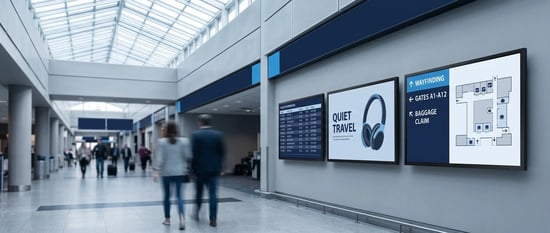
In a large, unfamiliar building, most people are quietly lost. They wander a corridor, backtrack, and eventually ask a staff member who has answered the same question a hundred times that week. A printed directory would help, except it went out of date the moment a department moved. Digital wayfinding solves that: navigation on a screen that anyone can read, that updates the instant something changes, and that can guide a visitor from where they are standing to where they need to be. This is what digital wayfinding is, where it works, and how to run it across a complex space.
Quick Takeaway
Digital wayfinding uses screens and interactive kiosks to help people navigate complex spaces, and it updates instantly.
It takes several forms: directory boards, interactive touch kiosks, directional screens, and live maps.
It works anywhere people get lost: corporate campuses, hotels, transit hubs, retail centers, and large public buildings.
Across a large facility, it takes a platform to run and keep current, and the people to keep it dependable.
What is digital wayfinding?
Digital wayfinding is the use of digital screens, and often interactive kiosks, to help people find their way through a space. Instead of a printed map or a fixed sign, it shows directions, directories, and maps on a display that can be updated in seconds and, where useful, interacted with. It usually takes one of a few forms.
- Directory boards. A screen listing departments, tenants, rooms, or services, with directions, that updates centrally instead of being reprinted.
- Interactive kiosks. A touch screen that a visitor uses to search for a destination and see the route to it, useful in larger or busier spaces.
- Directional screens. Displays that show which way to go at decision points, corridors, junctions, and lobbies, and can change with the layout.
- Live maps. A visual map of the space, kept current so it reflects the building as it is today, not as it was when the sign was printed.
Where digital wayfinding works
Anywhere a space is large or unfamiliar enough that people get lost, digital wayfinding earns its place. The settings differ, but the problem is the same.
- Corporate campuses and offices. Multi-floor headquarters and large offices, where visitors and even staff need help finding rooms, teams, and services.
- Hotels and resorts. Guiding guests to rooms, restaurants, event spaces, and amenities across a large property.
- Transit hubs. Directing travelers through busy, time-pressured spaces where a wrong turn has real consequences.
- Retail centers. Helping shoppers find stores, services, and amenities in large or multi-level formats.
- Large public buildings. Any venue, campus, or complex where a visitor arrives without knowing the layout.
How can digital signage enhance wayfinding?
A printed sign is fixed in time and space. Digital signage changes both, and that is where the value comes from. It updates instantly, so when a department moves or an event changes a room, the guidance changes with it, no reprinting, no outdated maps, and no sending people the wrong way. It can be interactive, so a visitor searches for exactly where they want to go rather than scanning a static board. It reduces the load on staff, who no longer field the same directions all day. It can adapt content to the moment and, where needed, present information in more than one language for a wider audience. And across a facility, it stays consistent, because every screen is driven from the same source. In short, digital signage turns wayfinding from a fixed object into a live service.
Forms of digital wayfinding
Directory boards
Departments and services are updated centrally.
Interactive kiosks
Search for a destination, see the route.
Directional screens
Which way to go at every decision point?
Live maps
The building as it is today, not last year.
See it for yourself
Wayfinding that stays current, everywhere
See how L Squared runs digital wayfinding across a building or a whole campus, from one place.
Book a demoRunning digital wayfinding at scale
For a single lobby, a wayfinding screen is simple. Across a large campus or many buildings, it becomes a program, and the difference between wayfinding that helps and wayfinding that misleads comes down to keeping it current. A directory is only useful if it is right, which means the moment a team moves or a space is renamed, every affected screen has to update. That is a platform capability: central management, so one change reaches every relevant display at once, with role-based access so the right people maintain the right locations. It is also a support one, because a wayfinding kiosk that has gone dark is worse than no kiosk at all, and proactive monitoring is what catches it before a visitor does.
This is where the platform and the people behind it matter as much as the maps. A large facility relying on digital wayfinding is making a multi-year commitment, and the vendors worth choosing are the ones who keep the program dependable. For L Squared, that shows up in a net retention rate of 107.7%, customers who stay and grow with us. For how wayfinding fits a broader rollout, our guides to corporate digital signage and selecting a digital signage vendor are useful companions, along with the way to think about securing signage across locations.
Frequently Asked Questions
What is digital wayfinding?
Digital wayfinding is the use of digital screens, and often interactive touch kiosks, to help people navigate a space with directions, directories, and maps. Unlike a printed sign, it can be updated instantly and interacted with, turning static navigation into a live service that reflects the building as it is today.
How can digital signage enhance wayfinding?
It updates instantly when a space changes, so guidance is never out of date; it can be interactive, letting visitors search for a destination; it reduces the load on staff who otherwise give the same directions all day; it can present information in more than one language; and it stays consistent across a facility because every screen is driven from one source.
What are the types of digital wayfinding?
The common forms are directory boards that list departments and services with directions, interactive kiosks where visitors search for a destination and see a route, directional screens that show which way to go at decision points, and live maps of the space. Many facilities combine several of these.
Where is digital wayfinding used?
Anywhere a space is large or unfamiliar enough that people get lost: corporate campuses and multi-floor offices, hotels and resorts, transit hubs, retail centers, and large public buildings. The setting varies, but the problem, helping people find their way, is the same.
How do you manage digital wayfinding across a large campus?
Through a centralized platform: one system to update every screen and kiosk at once, with role-based access so the right teams maintain the right locations, plus proactive monitoring to catch a failed screen quickly. This keeps the guidance accurate and consistent everywhere, which is what makes wayfinding trustworthy.
The Bottom Line: Navigation That Stays True
The value of digital wayfinding is not the screen. It is that the guidance is always right. A map is only helpful when it matches the building, and a printed one rarely does for long. Digital wayfinding keeps navigation current, makes it interactive where that helps, and stays consistent across an entire facility, so visitors find their way and staff stop being the directory. Done at scale, it depends on a platform that keeps every screen accurate and the people who keep it running.
That is the job L Squared is built for: digital wayfinding that updates the instant your space changes, runs across every location from one place, and is backed by people who keep it dependable. People and platform, so the way you point people is always the right way.
Wayfinding that is always up to date
See how L Squared runs digital wayfinding across a building or a whole campus, current on every screen.
Talk to our team