Whether it's a shortlisting, private RFP, or multi-quote assessment, no question, selecting the correct digital signage vendor today is key to stabilizing, aligning, and centralizing your operations.
This article is designed to help you identify the successful criteria for starting, evaluating, and selecting a digital signage partner and vendor for your next project. The focus is more on the software vendor than the overall project deliverable. Many customers either have their own screens installed OR procure their own with feedback and details. So we will focus on the key elements that make the difference between success and disappointment.
Let's start with some of the facts:
Many corporate digital signage projects fail not because of the technology (but that can be an issue) but because the vendor cannot support multi-location operations, misses out on enterprise IT security requirements, API functionality or integration capabilities, or content and user workflows have challenges at scale.
If you can, evaluate digital signage vendors on five operational criteria:
1) Security posture, SAML integration, and Scorecard reliability
2) Support and scalability success (are they 24/7)?
3) Content workflow flexibility (don't get boxed in)
4) Hardware agnosticism (not a religious term)
5) Total cost of ownership over 5 years (cost is always a factor)
The Real Problem with Vendor Selection
Corporate digital signage projects typically start with the IT, facilities, or communications team researching "digital signage software," comparing feature lists, sitting through 4 to 6 demos, and selecting the vendor with the best presentation. Then the project starts, and the problems begin: IT rejects the vendor's security posture, the platform cannot handle the company's multi-location structure, content creation becomes a full-time job nobody budgeted for, and 18 months later, the screens are either dark or showing the same stale slide deck from launch day.
The digital signage vendor evaluation process itself is the root cause. Feature comparisons and demo presentations are designed to make every vendor look identical. The differences that actually matter only surface during deployment, which is too late.
This guide focuses on the five operational criteria that separate vendors who can deliver corporate projects from vendors who can demo them. For a side-by-side look at the vendors themselves, see our comparison of the best digital signage software platforms in 2026. If you need the basics first, start with what digital signage software is.
Related Reading
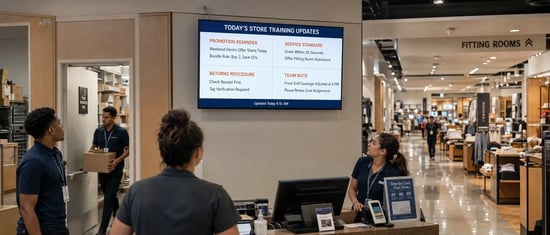
What corporate digital signage actually looks like at the floor level.
Criterion 1: Security Posture
Corporate IT will block any digital signage vendor that cannot pass a security review (especially these days). This is not optional, and it is not negotiable. The questions to ask in project questionnaires are:
Is the platform SOC 2 Type II certified?
Not SOC 2 Type I (a point-in-time snapshot). Type II means a third-party auditor verified that the vendor maintains security controls over a sustained period. If the vendor does not have SOC 2 Type II, your IT team will spend weeks conducting their own security audit, and many will simply reject the vendor outright.
Does the platform support SSO (SAML/OIDC)?
Corporate environments require single sign-on. If the signage platform uses its own username/password system outside your identity provider, IT will flag it as a shadow IT risk. The most common SAML formats are Okta, AAD (Azure Active), and Google. We have run across private and legacy SAML as well. Make sure this is included in your vendor (if it's important to your selection).
How does the platform handle network isolation?
Digital signage screens sit on the corporate network. Can the vendor's platform operate on a segmented VLAN with no inbound connections? Does it require ports to be opened through the firewall? What is the minimum network footprint? Ports are usually required to connect to databases and different application architectures.
What happens when the internet goes down?
Corporate offices lose connectivity. Screens in lobbies, cafeterias, and meeting rooms need to keep displaying content. Ask the vendor to demonstrate offline playback, not just describe it. How long can the player run without a server connection, and are there messages showing on screen (even if the content is cached)? Does it gracefully fall back to cached content or does it show an error screen? See if they have an image so you can be prepared.
Has the vendor completed a penetration test in the last 12 months?
Ask for the executive summary. Vendors who take security seriously will share it. Vendors who do not have one are telling you where security sits in their priority list. Minimum annual pen-testing should be demanded.
Criterion 2: Multi-Location Management
A single-office deployment is straightforward. The complexity that breaks corporate projects is multi-location: 20 offices across 3 countries, each with different content needs, different time zones, different languages, and different IT environments.
Can the platform federate content?
Corporate headquarters creates brand-compliant templates and mandatory messaging. Regional offices customize within those guardrails. Local offices add location-specific content (cafeteria menus, room schedules, local announcements). If the platform cannot handle this three-tier content model natively, someone will be manually updating 200 playlists every week. (Although 200 playlists or schedules are more than most ever need). This is the model L Squared Hub, our digital signage solution, is built around, with role-based access scoped to brand, region, and location. We have also integrated Asana.
How does the platform handle time zones and scheduling?
A "good morning" message that displays at 8 am Eastern but also at 8 am in the London and Singapore offices requires timezone-aware scheduling. This sounds basic, but many platforms schedule in a single timezone and require manual offsets for each location.
Can you manage 500 screens from a single dashboard?
Not 500 screens in theory. Ask the vendor to show you a customer deployment at your scale. If their largest customer has 30 screens and you need 500, you are their beta test. That is a risk you should price into the decision.
How does the platform handle inconsistent network quality across locations?
An office in downtown Toronto has fiber. A warehouse in rural Alberta has satellite internet. The platform needs to handle both without manual configuration per site.
Case Study
Multi-location at scale. One platform. See how Rogers Wireless did it.
Criterion 3: Content Workflow Flexibility
The most expensive component of any digital signage project is not the software or the hardware. It is the ongoing labor required to create, approve, and publish content. Most vendors demo a drag-and-drop editor that looks simple. The reality of corporate content workflows is not simple.
Who creates the content?
If the answer is "the marketing team," then marketing has just inherited a new production channel with no additional headcount. If the answer is "local office managers," then you need a platform that non-technical users can operate without training. If the answer is "an agency," then you need an approval workflow that prevents agencies from publishing unapproved content to your lobby screens.
Does the platform support approval workflows?
In a corporate environment, content displayed on screens in the lobby, executive floor, and client-facing areas requires approval before it goes live. A platform without a built-in approval workflow means someone is manually reviewing every content change via email. That process breaks within 60 days.
Can the platform pull from existing data sources?
Corporate environments already have content: SharePoint announcements, HR systems with benefit updates, facilities systems with room bookings, cafeteria menus from the food service provider. The signage platform should integrate with these sources and display them automatically, not require someone to manually recreate every piece of information as a signage layout.
What is the content creation learning curve?
Ask the vendor to let someone from your team (not a power user, not someone who attended training, just a random team member) create and publish a simple announcement in real time during the demo. Time it. If it takes more than 10 minutes, multiply that by the number of content updates per week and calculate the annual labor cost. That number belongs in the TCO comparison.
Criterion 4: Hardware Agnosticism
Corporate projects involve screens in different environments: a 98-inch video wall in the lobby, a 55-inch display in the cafeteria, a 32-inch screen outside each meeting room, and a tablet at the reception desk. The vendor's platform needs to support all of them without requiring proprietary hardware for each use case.
Does the platform support System-on-Chip (SoC) displays?
TCL, LG, Samsung, Hisense, and other commercial display manufacturers now include built-in media players (SoC) that eliminate the need for an external player box. SoC reduces hardware cost, simplifies installation, and removes a failure point. If the vendor requires their own proprietary media player for every screen, ask why. The ability to control remote sleep timers, upgrade and downgrade firmware, and lock out ports makes SoC an almost always net new choice for your screens. With almost zero security risk.
What happens when you need to replace a screen in 3 years?
Commercial displays have a 5 to 7 (some say 9) year lifecycle. Consumer TVs used as signage last 2 to 3 years in a commercial environment. If the vendor's platform is locked to a specific hardware generation, replacing screens means re-licensing, reconfiguring, or replacing the entire system. A hardware-agnostic platform avoids this trap.
Can the platform manage a mixed hardware fleet?
In practice, corporate deployments accumulate different hardware over time. The first 50 screens are Samsung. The next 20 are LG because procurement got a better deal. The meeting room panels are a third brand entirely. The platform needs to manage all of them from a single console.
Criterion 5: Total Cost of Ownership Over 5 Years
Vendors quote annual license fees. The actual cost of a corporate digital signage project over 5 years includes components that rarely appear in the initial proposal.
Software licensing: annual per-screen fee. Compare across vendors on a per-screen-per-year basis, not on aggregate package pricing that obscures the unit economics.
Hardware: screens, media players (if required), mounts, cabling, network switches. For a retrofit project (replacing existing screens or repurposing consumer TVs), add removal and disposal costs for old hardware.
Installation: professional installation costs $200 to $500 per screen, depending on complexity. A 200-screen project at $350 per screen is $70,000 in installation alone. Ask whether the vendor's platform supports remote provisioning (shipping a pre-configured player that local staff plugs in) vs. requiring a technician at every site.
Content creation labor: the ongoing cost of designing, producing, approving, and publishing content. Budget 4 to 8 hours per week of a designer or communications specialist's time for a 50-screen deployment. Scale linearly for larger deployments unless the platform automates content from existing data sources (Criterion 3).
Network infrastructure: if the existing network cannot support the bandwidth and security requirements, upgrading switches, cabling, or adding VLANs adds cost. Get the vendor's network requirements in writing before signing.
Support and maintenance: what is included in the license fee vs. what costs extra? 24/7 support, on-site service, firmware updates, platform upgrades, and API access are frequently quoted as add-ons after the initial sale.
Build a 5-year TCO model that includes all six components. Even among top digital signage vendors, the lowest license fee rarely means the lowest total cost.
The Pilot Test
Before signing a multi-year contract, deploy 3 to 5 screens in a real corporate environment for 30 to 60 days. Not a demo room. Not a sandbox. Real screens, real content, real users, real network.
During the pilot, measure:
- Time to deploy each screen from unboxing to live content
- Time for a non-technical user to create and publish a content update
- Uptime over the pilot period (target: 99.5%+ without manual intervention)
- IT team feedback on security review, network impact, and ongoing management burden
- Content team feedback on workflow, approval process, and ease of use
- If the content changes less than once per week, a well-designed static poster is cheaper and requires zero technology infrastructure.
- If the primary goal is meeting room scheduling, a dedicated room booking system (Robin, Envoy, Appspace) may be a better fit than a general-purpose signage platform.
- If the audience is primarily remote employees, the investment should go into digital workplace tools (Slack, Teams, intranet), not physical screens that remote workers never see.
Any digital signage vendor that resists a pilot, or insists the pilot requires their professional services team to manage, is telling you the platform cannot operate independently.
When Digital signage is the wrong solution.
Digital signage works best when the audience is physically present, the content changes frequently, and the information needs to reach people who do not check email or intranet regularly: lobbies, cafeterias, break rooms, factory floors, retail stores, and high-traffic corridors.
These are the questions most teams ask after narrowing down their list of digital signage vendors.
Trusted by Enterprise and Multi-Location Operators Across North America
Start your vendor evaluation the right way.
Frequently Asked Questions
How long does a typical corporate digital signage deployment take?
For a 50- to 100-screen project with standard network infrastructure already in place, expect 3 to 8 weeks from contract signing to all screens live. The biggest variable is not the technology but the content: who is creating it, who approves it, and how quickly the first content library is built. Projects that start content planning before hardware arrives deploy 40% faster than projects that wait until screens are mounted. A quick content transfer from one system to another saves a lot of time. Asset inventory and local screen configuration is what can take time.
What is the average cost per screen for a corporate deployment?
All-in (hardware (TV and mount), software license, installation), expect $1500 to $2,500 per screen for a standard commercial display with SoC, or CA$1,200 to $2,500 per screen with an external media player (depending on graphics cards & other specs). dvLED displays, Video walls, outdoor displays, and interactive kiosks are materially higher. These ranges assume commercial-grade hardware with a 5-year lifecycle.
Should we buy commercial displays or use consumer TVs?
Commercial displays cost 2x more than consumer TVs but last 2 to 3 times longer in a commercial environment, include SoC capability, support landscape and portrait orientation, and carry commercial warranties. Consumer TVs in a corporate environment are a false economy: they overheat in enclosed mounts, void their warranty when used commercially, and need replacement every 2 to 4 years. For any deployment expected to last more than 24 months, commercial displays have a lower total cost of ownership, especially when controlling the on/off power features through a platform your vendor built.
What bandwidth does digital signage require per screen?
For standard content (images, text overlays, short video clips), 2 to 5 Mbps per screen is sufficient. For 4K video playback or live streaming, budget 15 to 25 Mbps per screen. The more important question is whether the platform caches content locally (reducing ongoing bandwidth to periodic sync) or streams content in real time (requiring sustained bandwidth). Local caching is strongly preferred for reliability and network efficiency.
Can we use our existing screens?
In most cases, yes. If the existing screens have an HDMI input, they can accept a media player. If they have built-in SoC (Samsung Tizen, LG webOS, TCL, Hisense, etc.), they may run the signage platform natively without additional hardware. The vendor should assess your existing hardware as part of the pre-sale process at no cost.
Rated Best Customer Support

Brent Nacu
CRO at L Squared Digital
Brent Nacu is the Chief Revenue Officer at L Squared Digital, with 20+ years in digital signage. He helps organizations build display strategies that improve engagement, streamline operations, and drive real results.
LinkedIn