Digital signage software manages every action on a physical display: what appears, when it plays, and where it is routed. It handles asset storage, scheduling, data delivery to localized media players, visual output verification, and permission enforcement. The physical monitor represents merely the final inch of the pipeline; the software manages everything that precedes it.
Organizations frequently approach digital signage as a hardware initiative, selecting screens, mounting brackets, and installers while treating software as an afterthought. A year later, this results in static corporate lobbies cycling outdated launch-day welcome screens because modifying them requires credentials belonging to a former employee.
However, looking at the market through a single lens misses how the software actually splits. The category serves two entirely different operating models: light, self-serve content apps built for single-site businesses, and governed infrastructure platforms built for distributed, multi-location networks. Treating a small-business display tool like an enterprise system is heavy-handed overhead, but evaluating an enterprise network platform like a simple web app is where large deployments quietly fail.
Executive Takeaway
Two Different Tiers: Digital signage software ranges from simple, low-cost self-serve tools for single locations to governed, secure infrastructure platforms for multi-site enterprises.
The Five Functional Layers: Every platform relies on five core components: the content editor, the media player runtime, the scheduling engine, device management, and access control. Evaluating a tool solely on its visual templates introduces major operational blind spots.
Market Scale: The global digital signage market is valued between $21 billion and $34 billion, with hardware consuming roughly 59% of expenditures. Software dictates the ultimate operational ROI.
Cost Realities: Published monthly software licenses range from $8 to $45 per screen, which represents a fraction of the total five-year total cost of ownership (TCO).
Scale Requirements: While a single screen requires basic scheduling, managing hundreds of distributed screens mandates strict brand governance, proactive fleet monitoring, audited compliance, and responsive support.
In this guide
- Understanding the two halves of the market
- Functional breakdown: what the software controls
- Digital signage market data and benchmarks
- Core architecture: the five components
- Cloud vs. on-premises
- Vertical applications across tiers
- Total cost of ownership (TCO) modeling
- Rigorous evaluation methodology
- Frequently asked questions
Understanding the Two Halves of the Market
Before evaluating features, it helps to recognize which side of the digital signage ecosystem an operation falls into.
1. Self-Serve / SMB Content Tools
- Best for: Single-location businesses, local retail shops, boutique fitness studios, or regional operators running under 10 to 20 screens.
- How it operates: Users log into a streamlined web dashboard, drag and drop templates, upload media files, and publish playlists directly to screens.
- Core priorities: Extreme ease of use, low price points ($8 to $20/screen/month), and rapid deployment with zero IT involvement.
- What is typically omitted: Complex SOC 2 compliance, SCIM user provisioning, deep POS webhook integrations, and multi-tiered regional governance hierarchies. If a screen goes down in a single shop, physical intervention is fast and low-impact.
2. Enterprise Infrastructure Platforms
- Best for: Multi-location enterprises, corporate communications teams managing dozens of offices, major QSR chains, and retail or manufacturing networks.
- How it operates: It functions less like a design app and more like a governed operating system for physical screens. It integrates with corporate identity providers (Okta, Microsoft Entra), pulls real-time data via API from enterprise backends (ERP, POS, and BI systems), enforces rigid brand permissions across thousands of regional managers, and monitors hardware health continuously.
- Core priorities: Uptime reliability, security compliance, automated governance, offline network resilience, and immediate live human support when an issue occurs at scale.
Functional Breakdown: What the Software Controls
Regardless of scale, digital signage software bridges the gap between raw assets and physical displays. An administrator uploads content, designates target screens, establishes delivery schedules, and publishes. The platform transmits these payloads to the media player situated behind each monitor, which handles rendering while the software continuously audits network connectivity, display power states, and visual output.
Across both SMB and enterprise tools, the software orchestrates five operational pillars:
- Content Repository: Centralized libraries supporting imagery, video, PDFs, dynamic templates, and live data widgets.
- Scheduling Engine: Rules-based distribution directing specific media assets to targeted displays across temporal coordinates.
- Delivery Pipeline: Secure transport mechanisms pushing payloads to remote media players while maintaining localized caches.
- Device Monitoring: Real-time tracking of online player statuses, physical monitor power states, and actual visual rendering.
- Governance & Permissions: Enforcing administrative controls, ranging from basic user logins up to global brand template lockdowns.
Digital Signage Market Data & Benchmarks
Verifiable market data provides an accurate baseline for buyers navigating the software landscape:
| Metric / Figure | Operational Context & Industry Implications | Source & Date |
|---|---|---|
| $21.1B to $33.6B | Projected global market size, growing at 6.6% to 8.2% annually. Discrepancies stem from hardware counting methodologies. | MarketsandMarkets (Jan 2026); Grand View Research (Jun 2026) |
| 59.1% | Share of total budget allocated to hardware, with retail serving as the largest vertical application (18.6%). | Grand View Research (2025 data, published Jun 2026) |
| $1.55 Trillion | Projected US restaurant sales, driving heavy capital investment in automation, analytics, and labor-saving software. | National Restaurant Association (Feb 2026) |
| 12% | Proportion of retail media networks capable of cross-channel measurement, highlighting the enterprise necessity for verifiable proof-of-play audit logs. | Koddi and Forrester (Nov 2025) |
| 3 of 7 | Number of major platform vendors publicly publishing both SOC 2 Type II attestations and ISO 27001 certifications. See the 2026 platform comparison. | L Squared Audit (Oct 2026) |
| $8 to $45 | Published monthly per-screen licensing fees for standard business tiers, excluding long-term hardware and operational costs. | Vendor Pricing Pages (Oct 2026) |
| < 1 Hour | Time to restore full capacity after a failure at The Golf League, and store retrofit time reduced to minutes at The UPS Store. | L Squared Case Studies (The Golf League, The UPS Store) |
Core Architecture: The Five Components
Every digital signage software platform is built on the same five foundational layers. Market differentiation lies in the engineering depth and robustness of each component:
- The Content Management System (CMS): Beyond asset storage, tools range from basic drag-and-drop editors for SMBs to enterprise CMS architectures utilizing locked brand templates and live data integrations (Power BI, Microsoft 365, SharePoint, POS data) that enable non-technical operators to execute authorized updates instantly.
- The Media Player: The physical computing device executing the render schedule. Options range from basic consumer streaming sticks for single screens to enterprise-grade hardware (such as L Squared's LP5) featuring outbound-only network connections, 64GB of local cache storage, and hardware lockdowns. Enterprise platforms also run across commercial display operating systems (Samsung Tizen, LG webOS, Android, ChromeOS, Windows, BrightSign).
- The Scheduling Engine: Moves from static calendars into rules-based dayparting. It automates localized time-zone transitions (for example, swapping breakfast menus across time zones simultaneously) and shift-change safety alerts without manual intervention.
- Device Management & Monitoring: Addresses the "online false positive" trap where a media player reports active network connectivity while the physical display is dark. Advanced platforms offer remote display power control, automated alerts, and screenshot verification of active visual output alongside proof-of-play auditing. The failover monitoring guide covers the detail.
- Access Control & Security: Spans simple password logins for SMBs up to enterprise integrations connecting corporate identity providers via SAML SSO, enforced MFA, and granular Role-Based Access Control (RBAC) scoped by brand, region, and store, backed by independent SOC 2 Type II and ISO 27001 compliance.
See the five components working together on a multi-location network with the L Squared digital signage solution.
See the platformArchitectural Deployment: Cloud vs. On-Premise
Deployment models vary based on organizational infrastructure requirements:
- Cloud-Hosted Architecture: Optimal for distributed multi-location networks and SMBs alike. Delivers instant updates, centralized monitoring, and automated provisioning across sites without requiring technician dispatches. The vendor manages server patching and high availability on a predictable per-screen subscription model.
- On-Premise Deployment: Required for enterprises operating under strict data-residency mandates, air-gapped environments, or internal compliance policies requiring content servers to remain behind the corporate firewall. Remote sites require secure VPN tunnels or hybrid network designs. Typically structured via perpetual licenses or custom enterprise quotes.
Vertical Applications Across Tiers
Digital signage serves vastly different operational goals depending on the organization's footprint:
- Small Business / Single Site: Focuses on local promotions, welcome messaging, and daily menus. Strain points are minimal; ease of use and low cost take precedence.
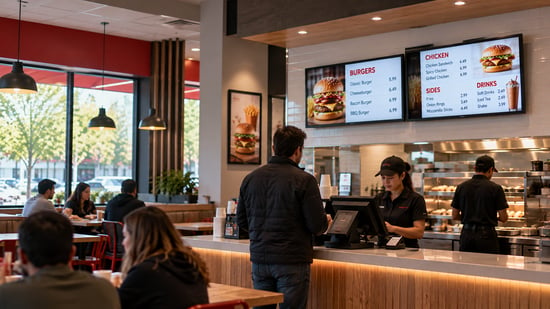
- QSR & Restaurants: Managing POS-driven menu boards, drive-thru lanes, and automated dayparting schedules. Primary strain: POS integration depth and real-time inventory synchronization. See the menu board software comparison.
- Retail: Executing regional promotions, synchronized window displays, and electronic shelf-label pricing updates. Primary strain: Multi-location brand governance and localized promotional flexibility.
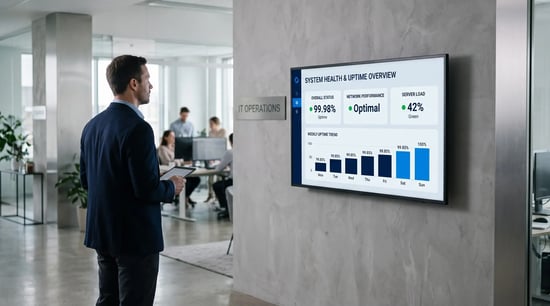
- Manufacturing: Powering floor-level production dashboards, shift handoff boards, and real-time safety metric counters integrated with MES and ERP platforms. Primary strain: Data integration reliability and hardware durability in harsh physical environments.
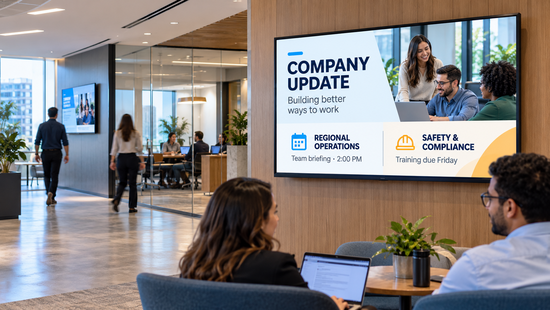
- Corporate Communications: Deploying lobby directories, cafeteria displays, and breakroom announcements integrated with corporate identity and HR systems. Primary strain: Security review, SSO/SCIM identity integration, and corporate compliance.
Total Cost of Ownership (TCO) Modeling
Published per-screen prices across the major platforms, checked October 7, 2026:
| Platform | Published business pricing (per screen per month) | What the top tier adds |
|---|---|---|
| L Squared | $15 (Professional); Enterprise by quote, customized to your requirements | SSO, proactive monitoring, custom integrations; 24/7/365 human support is on every plan, not only the top one |
| Yodeck | Free for one screen; $8, $12, $16; Enterprise+ by quote | SAML SSO, 2FA, 24/5 support; 24/7 priority on Enterprise+ only |
| OptiSigns | $10, $12.50, $15, $30; Enterprise $45 with a 25-screen minimum | On-premise or private cloud, success manager, priority support |
| ScreenCloud | $20 (Core), $30 (Pro), billed annually; Enterprise by quote | SSO, premium support tier, success manager |
| Appspace, Navori, Rise Vision (business) | Not published; quote | Suite bundles, perpetual licenses, or business tiers priced per deal |
Published software licenses represent only one financial variable in a digital signage deployment. A comprehensive five-year financial model accounts for:
- Software Licenses: Monthly per-device fees matched to required enterprise or SMB tiers.
- Hardware Infrastructure: Commercial displays, media players, mounts, and cabling.
- Deployment & Installation: Professional installation or pre-staged remote provisioning that allows local staff to execute plug-and-play setups.
- Content Production: Internal labor hours reduced significantly through automated data integrations and template governance.
- Operational Overhead: IT resources required to maintain system uptime, which escalates rapidly on unmanaged platforms.
Rigorous Evaluation Methodology
Buyers should test shortlisted platforms on three operational criteria before signing contracts:
- Measure the exact elapsed time required to execute a routine price change from login to live visual output.
- Sever the network connection to audit local caching behavior and system resilience during outages.
- Initiate a support ticket during off-hours to evaluate actual response times and engineering availability.
Frequently asked questions
What is digital signage software?
Digital signage software is a content management system for screens. It stores and designs content, schedules what plays on which displays and when, delivers it to a media player behind each screen, monitors that each display is on and showing the right thing, and controls who is allowed to make changes. It is the software layer of a digital signage system; the displays and players are the hardware layer.
What is the difference between digital signage software and a digital signage CMS?
Nothing in practice. "Digital signage CMS" describes the same product by its core function: content management. Vendors use both terms. The CMS is one of five parts of the software, alongside the media player software, the scheduling engine, device management, and access control, so a platform should be judged on all five, not on the content editor alone.
What hardware does digital signage software run on?
It depends on the platform. Hardware-open platforms run on the system-on-chip inside commercial displays (Samsung Tizen, LG webOS), on Android, ChromeOS, and Windows devices, on BrightSign players, and on the vendor's own player, such as L Squared's LP5. Hardware-locked platforms require the vendor's own player for every screen. Open platforms cost less to expand and to refresh when displays reach the end of their life.
What happens to digital signage when the internet goes down?
On a well-built platform, nothing visible. The media player stores content locally and keeps playing its last schedule until the connection returns, then syncs any changes it missed. The platform's monitoring flags the player as offline so someone can check the site. On a platform without local storage, the screen goes black or shows an error, which is why offline playback should be demonstrated, not described, before purchase.
How much does digital signage software cost per screen?
Published business pricing across the major platforms runs from about $8 to $45 per screen per month as of October 2026, with enterprise-focused vendors quoting instead. The license is usually the smallest part of total cost; hardware, installation, content production, and staff time to run the system are the larger lines over five years.
How big is the digital signage market?
Estimates for 2026 range from about $21 billion (MarketsandMarkets, January 2026) to about $34 billion (Grand View Research, June 2026), depending on how much display hardware is counted. Grand View puts hardware at 59.1% of the market and retail as the largest application at 18.6%. Both firms project growth between 6.6% and 8.2% a year through the early 2030s.
Is digital signage software secure enough for a corporate network?
It can be, and the way to know is evidence rather than assurance. Look for players that connect outbound only and can be locked down, encryption in transit and at rest, single sign-on and multi-factor authentication tied to your identity provider, role-based access, and independent attestations such as SOC 2 Type II and ISO 27001. Ask for the reports under NDA and for the vendor's penetration-testing cadence before the platform goes on your network.
The bottom line
A single screen needs a schedule. A network of hundreds needs governance, monitoring, audited security, and a person who answers at 2 am. Match the software to the tier you actually operate in, and to the network you will have in three years.
L Squared Hub is a digital signage CMS built on all five components for organizations running screens across many locations: cloud or on-premises, open hardware, role-based access from brand to store, SOC 2 Type II and ISO 27001:2022 audited, and 24/7/365 live human support on every plan. If that is the network you run, tell us your footprint, and we will tell you straight whether we are the right fit.
Make it Visible.